// project
Edval Canvas Bridge
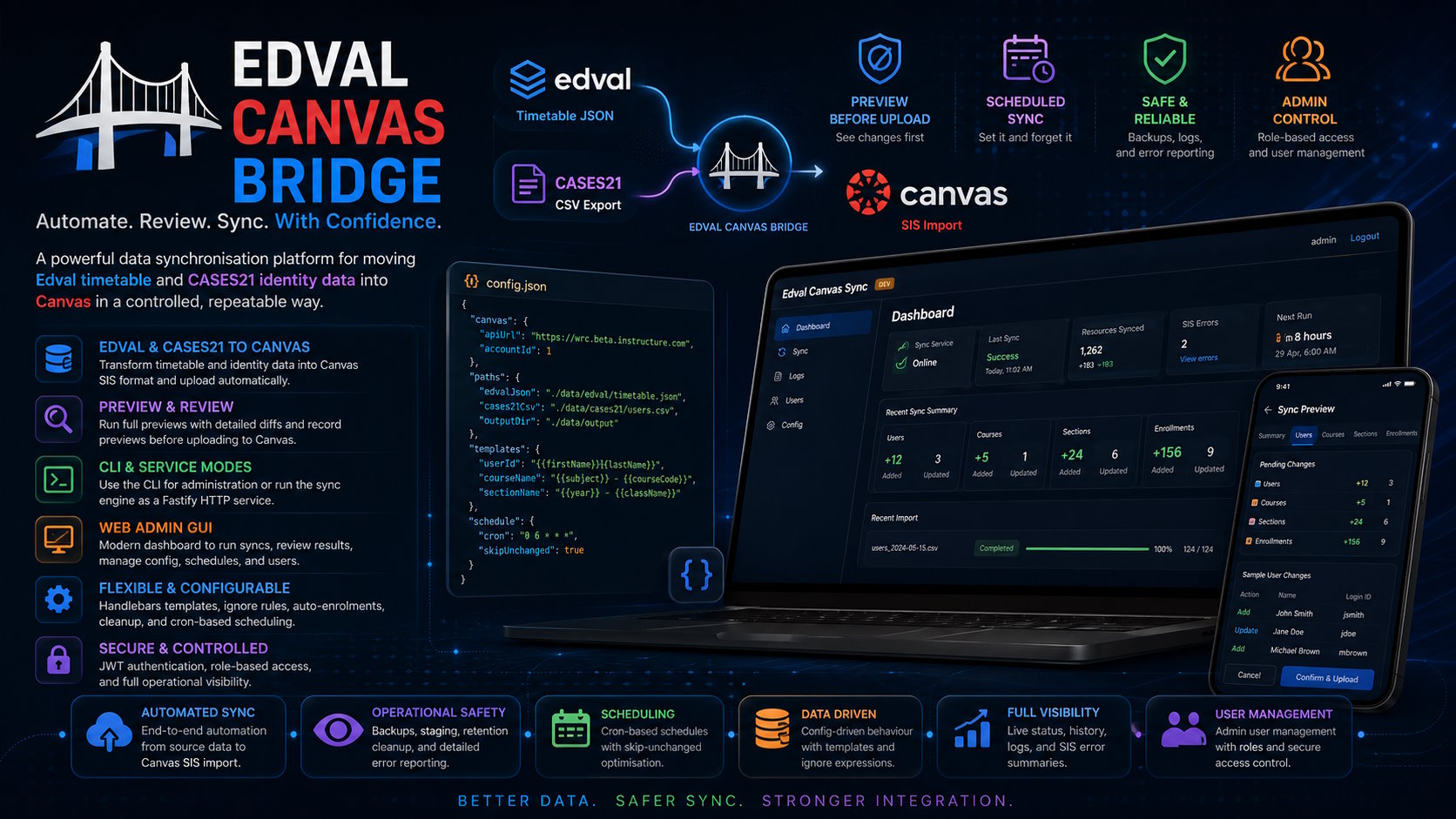
Overview
Edval Canvas Bridge is a data synchronisation platform for moving school timetable and identity data into Canvas in a controlled, repeatable way.
The project takes Edval timetable exports and CASES21 CSV data, transforms them into Canvas SIS import files, and provides both a CLI-driven sync engine and a separate browser-based administration interface for running, reviewing, and scheduling synchronisations.
Rather than treating the job as a one-off script, the system is structured as a proper operational tool: it supports configuration management, preview-before-upload workflows, scheduled runs, backups, cleanup, auth, and an admin-facing GUI for day-to-day use.
Project Context
Schools often end up bridging multiple systems that were never designed to work together cleanly.
In this case, Edval timetable data, CASES21 exports, and Canvas SIS imports all have different formats, naming conventions, and operational constraints. Moving that data manually is slow and error-prone, while a single rigid script is difficult to maintain when local rules or naming schemes change.
Edval Canvas Bridge was built to turn that integration problem into a reusable tool with both automation and human review built in.
Key Features
Edval and CASES21 to Canvas Synchronisation
- Reads Edval timetable JSON exports and CASES21 student and staff CSV files
- Generates Canvas SIS data for users, courses, sections, and enrollments
- Uploads the generated data into Canvas using SIS import workflows
Preview-First Sync Workflow
- Supports running a full preview before uploading changes to Canvas
- Produces diff summaries and record previews for users, courses, sections, and enrollments
- Allows operators to confirm or cancel uploads after reviewing the pending changes
CLI and Service Modes
- Includes a CLI for direct administration tasks and sync execution
- Supports configuration output and repair workflows
- Can run as a Fastify-based sync service with HTTP endpoints for health, status, preview, confirm, cancel, and config reload actions
Browser-Based Admin GUI
- React and Mantine GUI for dashboarding, configuration, sync execution, and review
- Shows service health, last sync status, next scheduled run, live progress, and SIS error summaries
- Includes dedicated pages for sync operations, config editing, login, first-run setup, and user management
Flexible Configuration Model
- JSON-based configuration for Canvas connection details, source file paths, templates, ignore rules, auto-enrolments, cleanup, and scheduling
- Handlebars-based templating for generating SIS IDs, course names, section names, and term structures
- Config editor supports cron scheduling, validation, ignore-rule management, and config path management
Scheduling and Operational Safety
- Cron-based scheduled syncs
- Optional "skip unchanged" behaviour to avoid unnecessary imports when source files have not changed
- Automatic backups, logs, staging folders, and retention cleanup
- Batch and override modes exposed with clear warnings in the GUI because of their operational risk
Authentication and Administration
- First-run setup flow for creating the initial admin user
- JWT cookie-based authentication
- Role-based access between standard and admin users
- Admin user management for creating, updating, and deleting access to the tool
Architecture
The project is structured as a TypeScript monorepo with separate packages for the sync engine, CLI, GUI, shared contracts, and utilities.
Edval JSON + CASES21 CSV
        ->
Sync Engine
        ->
Canvas SIS CSV + Import Workflow
        ->
CLI / HTTP Sync Service
        ->
React Admin GUI
Notable Engineering Decisions
Monorepo Split by Responsibility
The project separates concerns into dedicated packages:
contractsfor shared DTOs and config shapessyncfor transformation and import logicclifor command-line and service executionguifor the web applicationutilsfor shared prompting and helper behaviour
That keeps the integration logic reusable across both terminal and web-driven workflows.
Preview Before Upload
One of the strongest design choices in the project is the explicit preview-and-confirm workflow.
Instead of immediately uploading every generated change to Canvas, the system can run the sync, compute diffs, expose summaries and record previews, and only proceed once an operator confirms the upload.
That is a much safer pattern for school data than treating sync as an opaque fire-and-forget job.
Data Transformation as Configuration
The bridge does not hardcode all naming rules.
Using Handlebars templates and ignore expressions allows course IDs, section names, term IDs, and exclusion logic to be adapted without rewriting the core sync engine for every local convention.
Decoupled GUI and Sync Service
The admin GUI talks to a configurable sync service URL rather than embedding all of the sync execution directly into the same process model.
That separation makes the operator experience cleaner while keeping the actual synchronisation engine independently runnable through the CLI or HTTP service.
Technical Highlights
TypeScript Integration Tooling
- Multi-package TypeScript codebase with shared contracts across the stack
- Strongly typed sync resources for users, courses, sections, enrollments, terms, and import errors
- Shared request and response shapes between the service and GUI layers
Canvas SIS Automation
- Exports existing Canvas SIS data for comparison
- Generates and stages CSV resources in dependency-safe order
- Builds zip archives for SIS import
- Tracks import progress and returns SIS import errors for operator review
Operational Runtime Features
- Fastify-based sync and admin services
- SQLite and Sequelize-backed GUI settings and user management
- Pino logging, staged working directories, retention cleanup, and backup archives
- File-change-aware scheduling using cron and sync state snapshots
Admin Experience
- Live dashboard for service and schedule visibility
- Config editing for endpoints, paths, templates, ignore rules, auto-enrolments, cleanup, and scheduling
- Sync page with resource scoping, filtering, advanced warnings, progress tracking, and diff review
What This Demonstrates
Edval Canvas Bridge demonstrates integration engineering, automation design, full-stack tooling, and operational thinking.
It shows the ability to:
- design a reusable bridge between real-world systems with incompatible data models
- build both the automation engine and the admin experience around it
- treat operational safety as a first-class requirement through previews, confirmations, and staged imports
- turn an integration problem into a maintainable product rather than a fragile script
Outcome
This project is a strong example of building practical education-focused infrastructure with both backend automation and operator-friendly tooling.
Instead of solving the problem with a single script, Edval Canvas Bridge grows into a full platform for configuring, reviewing, running, and scheduling synchronisation between Edval, CASES21, and Canvas.
AI Disclosure
AI was used to help build parts of the GUI side of the application.
The sync class, CLI and core synchronisation logic were built by hand.