// project
Mass Effect Roleplay
Overview
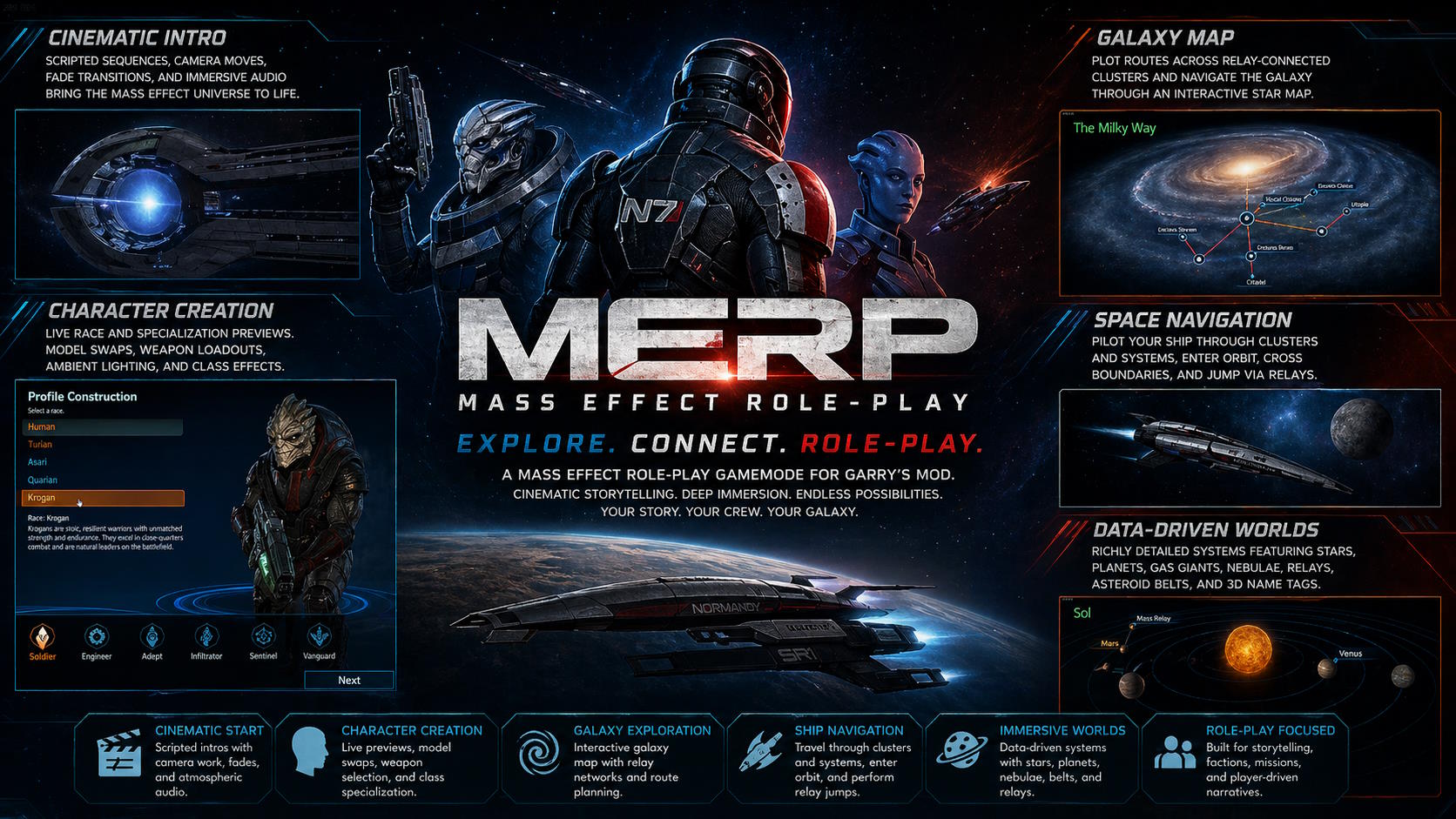
MERP (Mass Effect Roleplay) is a UI-focused vertical slice of the Mass Effect experience, built as a Garry's Mod gamemode in TypeScript and compiled to Lua.
Instead of treating menus as flat overlays, the project introduces a reusable real-time presentation layer for cinematic scenes, interactive character creation, galaxy navigation, and seamless transitions between them.
The result is a fully playable recreation of much of Mass Effect's iconic front-end gameplay loop: an animated Earth-and-Moon start screen, main menu, live 3D character creator, intro sequence, galaxy map, cluster navigation, system flight, mass relay jump transitions, and cinematic location approaches.
Although the broader RPG systems were never completed, the UI and presentation layer became a substantial engineering project in its own right.
Key Features
Cinematic Start and Intro Sequences
- Scripted camera moves, timed fades, layered audio, animated backgrounds, and scene transitions
- An Earth-and-Moon start screen that behaves like a real-time scene instead of a static menu backdrop
- Intro flow that carries the player from menu presentation into the rest of the experience cleanly
Interactive Character Creation
- Live 3D character creation with immediate visual feedback
- Race and specialization changes update models, weapon previews, ambient lighting, class-specific effects, and camera framing in real time
- Character setup feels like an in-engine presentation sequence rather than a form layered over the game
Playable Galaxy and Navigation Flow
- Galaxy map with route plotting across relay-connected clusters
- Seamless transitions into cluster and system views
- Ship navigation through cluster and system spaces with orbit detection, enter-orbit interactions, edge-of-system transitions, and relay jump cutscenes
Data-Driven Space Scenes
- Planetary systems defined through structured data rather than bespoke one-off scenes
- Supports stars, planets, gas giants, cloud layers, asteroid belts, relays, nebulae, orbit rings, and 3D name tags
- Content definitions drive both the navigation layer and the visuals shown to the player
Mass Effect-Inspired Presentation
- UI styling, pacing, and audio behaviour tuned to match the feel and visual language of Mass Effect
- Focus on recreating the tone of the original interface, not just copying isolated screens
Notable Engineering Decisions
Reusable Scene Framework
Built a custom scene framework on top of Garry's Mod's model panel system so major screens could share the same primitives for cameras, entities, overlays, fades, and animation.
This avoided hardcoding each screen separately and made cinematic behaviour reusable across menus, character creation, and navigation scenes.
Virtual Entities Alongside Model Rendering
Introduced "virtual entities" alongside normal clientside models, allowing procedural objects such as skyboxes, world spheres, orbit rings, glow sprites, labels, and effects to render through the same update pipeline.
That kept scene logic unified even when some objects were not traditional in-game entities.
Tween-Style Camera and Animation Helpers
Created tween-style helpers for movement, rotation, look targets, and FOV changes.
That made cinematic camera work and transition scripting reusable instead of writing one-off interpolation logic for every scene.
Data-Driven Galaxy Structure
Modeled the galaxy as structured cluster, system, and body data instead of building one handcrafted scene at a time.
This let the galaxy map, route tracing, and navigation layers be generated from content definitions rather than tightly coupled UI scripts.
Utility Layers for Complex Presentation Code
Wrote small rendering and UI utility layers for screen scaling, 3D2D labels, cursor bearing, material reuse, glow effects, and music fading to keep the higher-level presentation code maintainable.
Technical Highlights
TypeScript-to-Lua Tooling
- Built in TypeScript using TypeScriptToLua for compilation to Lua
- Used gmod-typescript to target Garry's Mod cleanly from a TypeScript codebase
Camera Choreography
- Smooth interpolation between positions, angles, and zoom levels
- Reusable helpers for cinematic framing and scene transitions
- Real-time camera behaviour tied to both scripted events and player interaction
Space Scene Rendering
- Layered skyboxes, nebula shells, and textured world spheres to create convincing space scenes inside a game UI context
- Procedural rendering techniques used to make static UI environments feel alive and dimensional
Interaction and Navigation Systems
- Real-time interaction between input, camera direction, ship orientation, hover states, and scene transitions
- Route traversal and path visualisation across a relay network rendered directly on the galaxy map
- Navigation flow designed to feel continuous across galaxy, cluster, system, and orbit contexts
Audio State Management
- Looping tracks, timed cues, fade-ins, fade-outs, and scene-specific transitions
- Audio treated as part of the presentation system rather than as an afterthought layered onto UI screens
What This Demonstrates
MERP highlights real-time UI engineering, graphics programming, interaction design, tool-building, and systems thinking.
It demonstrates the ability to:
- build reusable abstractions instead of one-off screens
- create polished player-facing experiences with strong presentation value
- model structured game content so navigation and rendering layers can be generated from data
- translate the feel of an existing game into a custom technical framework rather than just reproducing static visuals
Outcome
Even as an unfinished vertical slice, MERP became a substantial technical project because the core challenge was not only visual fidelity, but building the reusable systems needed to support that fidelity in real time.
It remains a strong portfolio example of UI-heavy game programming, presentation system design, and creating cinematic interactive experiences inside an unconventional engine context.