// project
Snipe-Loaner
Overview
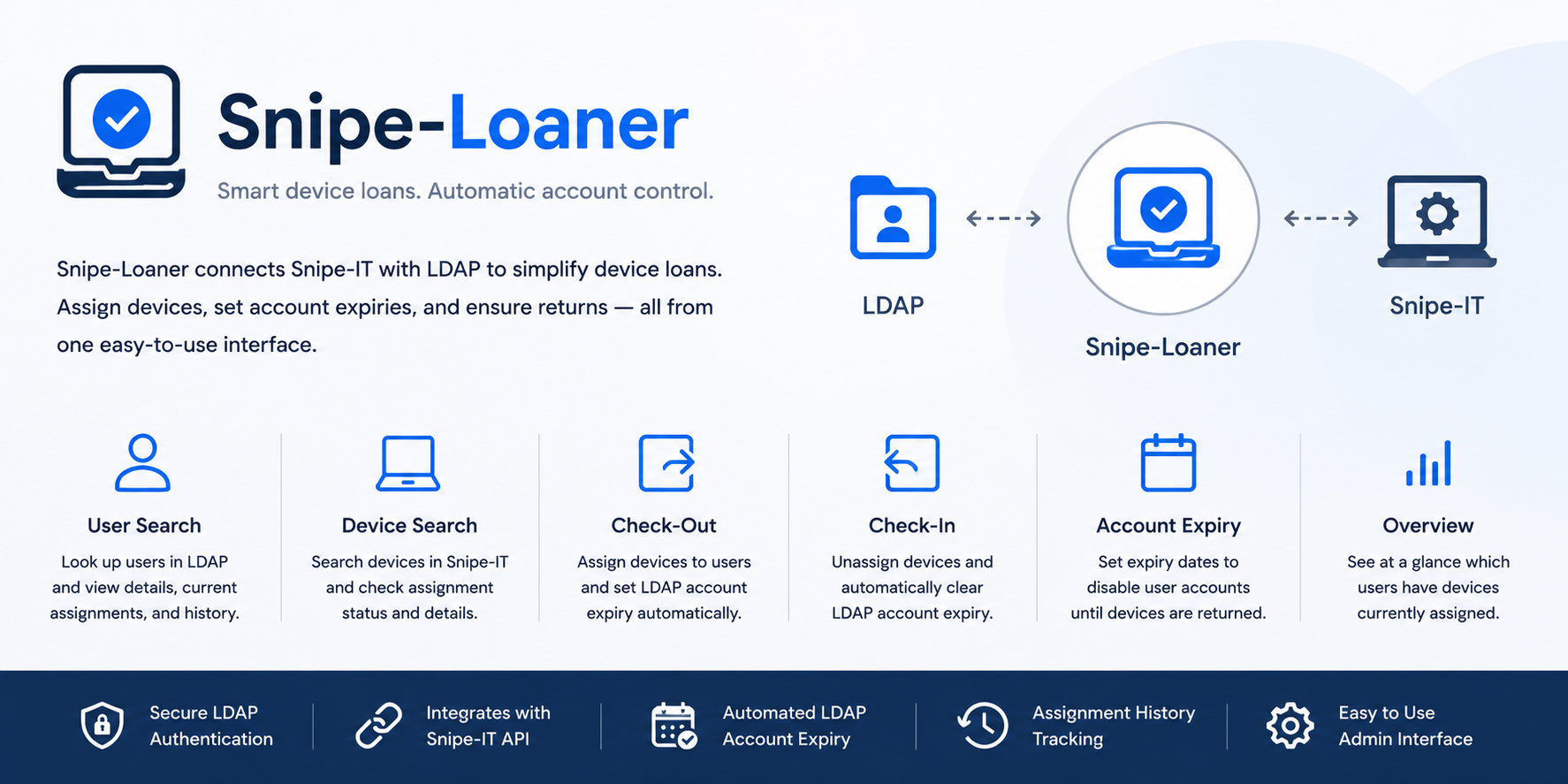
Snipe-Loaner is a Node.js application for managing short-term device loans using Snipe-IT and LDAP.
It provides administrators with a React-based interface for looking up users and devices, checking assets in and out, and tying those loan workflows to LDAP account expiry dates so borrowed devices are returned promptly.
The application was built around a practical school IT workflow: library or support staff need a quick way to loan devices, see who has what, and apply consequences when devices are not returned on time without manually switching between Snipe-IT and directory administration tools.
Key Features
LDAP Administrator Login
Administrators log in using LDAP credentials.
The backend verifies the user against the directory and checks membership of an allowed access group before returning an encrypted session payload to the browser.
User Search
The interface can search for a user in LDAP and show:
- directory identity details
- organisational unit context
- current LDAP account expiry
- linked Snipe-IT user details
- currently assigned loan devices
- recent assignment history where available
Device Search
Administrators can search Snipe-IT by asset tag to inspect a device, see its current assignment state, and review recent checkout activity.
This supports both user-first and device-first workflows: staff can start from the person borrowing the device or from the physical asset being scanned or typed in.
Device Checkout
When a device is available, Snipe-Loaner can check it out to the selected Snipe-IT user.
During checkout, administrators can set an expected return date. If the target user is not staff, the application also updates the LDAP accountExpires attribute so the account expiry aligns with the loan due date.
Device Checkin
When a device is returned, the application can check it back in through the Snipe-IT API.
If the loan had an expected checkin date, Snipe-Loaner also clears the user's LDAP account expiry, restoring normal access once the device is returned.
Deployed Device Overview
The app includes an overview of deployed devices, giving administrators a quick view of loaned assets without needing to inspect each device individually.
Architecture
LDAP Login
    ->
Encrypted Browser Session
    ->
React Admin Interface
    ->
Express API
    ->
LDAP Directory + Snipe-IT API
The React client handles the administrator workflow, search forms, date picker controls, notifications, and device action cards.
The Express backend handles authentication, Snipe-IT API calls, LDAP lookups, and LDAP account expiry updates.
In production, the Express server also serves the built React application, keeping deployment to a single Node.js service.
Technical Highlights
Snipe-IT Integration
The backend uses the Snipe-IT API to:
- search hardware by asset tag
- look up users
- retrieve assigned assets
- fetch recent asset activity
- perform checkout and checkin operations
- list deployed loan devices
LDAP Account Expiry Automation
The most important automation in the project is the link between loan state and LDAP account expiry.
When an asset is checked out with a return date, the app can set the borrower's LDAP account expiry. When the asset is checked back in, that expiry is cleared automatically.
This turns device return policy into an operational workflow rather than a manual reminder process.
Session Handling
After LDAP login, the server encrypts the administrator credentials into a session payload.
Subsequent API calls decrypt the session server-side, re-bind to LDAP, and perform the requested lookup or update. This keeps privileged directory operations behind the backend while allowing the browser UI to remain responsive.
Focused Admin Interface
The interface is intentionally split into two main lookup columns:
- user lookup
- asset lookup
This mirrors how loan desk workflows happen in practice. An administrator may start with a student ID, an asset tag, or a currently deployed device list and still reach the same checkout or checkin action.
Windows Service Deployment
The project includes Windows service configuration for running the Node.js server as a background service.
That made it suitable for deployment on internal school infrastructure where the loan management tool needed to be available without a developer session.
Problem Solved
Device loans are easy to lose track of when the asset register, user directory, and return enforcement process are handled separately.
Snipe-Loaner connects those systems into one workflow:
- Snipe-IT remains the source of truth for asset assignment
- LDAP remains the source of truth for user identity and access
- administrators get a focused interface for checkouts and returns
- overdue-return enforcement is handled through account expiry automation
Tech Stack
- Node.js
- Express
- React
- Semantic UI React
- Snipe-IT API
- LDAP / LDAPS
- Axios
- Windows Service Wrapper